Teachers play a vital role in shaping the minds of future generations. To honor their contributions, many countries celebrate Teacher’s Day—though the dates and traditions vary from one country to another.
World Teachers’ Day is fast approaching! On October 5, over 100 countries, including my home country, the Philippines, will join in celebrating our beloved teachers. On this special day, students and parents typically organize programs, performances, tribute videos, or give thank-you messages to show appreciation.
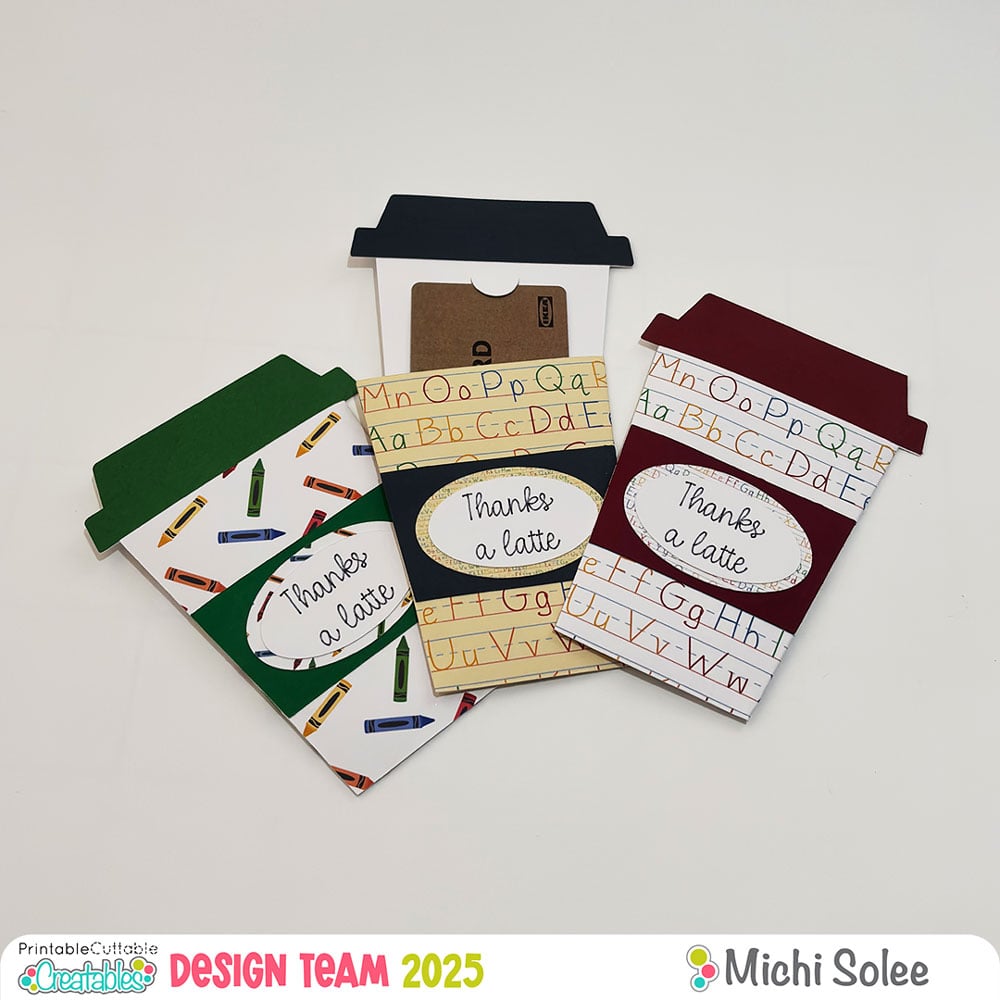
Gift-giving is not expected, but thoughtful tokens, such as handmade cards, snacks, flowers, or gift cards, are always appreciated. That’s why I’m sharing this teacher’s day gift card idea that you can easily make for Teacher’s Day today!
I’m using Back to School Digital Paper Pack + Bonus Seamless Patterns and Coffee Cup Gift Card Holder SVG File from the Printable Cuttable Creatables website.
Materials and Tools:
- Cricut Maker + Blade
- Cricut Scoring Stylus of Scoring Wheel
- Cricut Pen
- Printer
- Cardstock
- Adhesive
The Coffee Cup Gift Card Holder is a ready-to-make file. This project is beginner-friendly—just upload the SVG file to Cricut Design Space and tweak a few functions like scoring and drawing.
Then, cut the design using your choice of cardstock and patterned paper.
I don’t hoard physical patterned paper, so I love using digital paper packs. They’re convenient because I can print my own whenever I need them!
Here are 3 ways you can use digital paper in Cricut Design Space:
1. Print Directly on Cardstock
Just print the digital paper on white cardstock, cut it, and use it for your project. (If you saw my Scarecrow Gift Tag post, you know I did this for the scarecrow’s hat!)
2. Upload as an Image
• Upload the digital paper as an image
• Resize it to fit your design
• Use the Slice tool to cut the shape from the digital paper

3. Upload as a Pattern Fill
• Click Upload, then Pattern Fill, and upload your pattern
• Wait for the prompt “Pattern Upload Successful”
• Select the layer you want to add a pattern to and change it to Print Then Cut
• Click the color box, and from the drop-down, choose your pattern
• Customize it by clicking Edit Pattern to scale, rotate, flip, or change its orientation
This third option gives you more flexibility in customizing your pattern.
After editing your SVG file, click “Make It” and follow the prompts for printing, score, draw, and cut.

Then, simply assemble the pieces!

This teacher’s day gift card idea offers a personal and thoughtful way to say “Thank You” to the educators who make such a difference in our lives.


More Gift Card Holder SVG Files


Whether you’re a student, parent, or fellow crafter, I hope this project inspires you to create something meaningful for the teachers in your life. Let’s continue to celebrate and uplift our educators not just on October 5, but every day.
If you’d like to recreate this project, visit the Printable Cuttable Creatables website to download the files, and don’t forget to use my code MICHIPS15 for 15% off.
– Michi


Affiliate Disclosure: I may be an affiliate for some products recommended in this post. This means that if you purchase items through my links I will earn a small commission, at no extra cost to you. I only recommend products that I have personally used and enjoy and when you order through my link, it helps me continue to offer you weekly free SVG files, digital papers, scrapbook sketches, tutorials, and other fun things. Thank you in advance for your support!