

Ice Cream Sundae Sign Tutorial
Hi there! I often host fun events and have stations for guests to get food and drink as they please. Each station has a cute setup and I wanted to make an ice cream themed sign for the events that include a sundae bar. This Ice Cream Sundae Sign Tutorial is such a fun way to dress up your table and make the whole setup feel extra special.
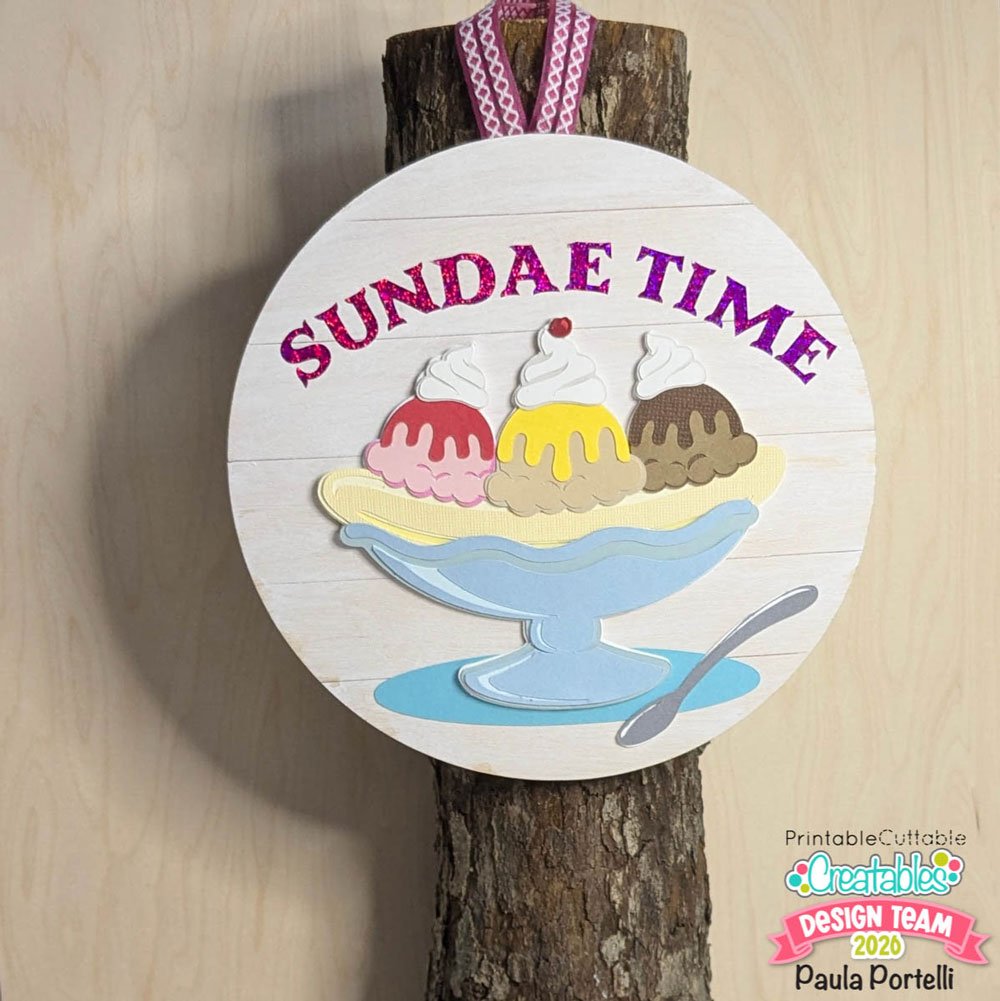
Supplies Used:
- Ice Cream Sundae Banana Split SVG Files
- Cardstock in your choice of colors
- Adhesive
- 6” wood round
- White paint
- Paint brush
- Brown fine tip marker
- Ruler
- 8” ribbon or twine
- Hot glue and hot glue gun
- Cutting machine, such as a Cricut machine or Silhouette Cameo
Paint the wood round with diluted white paint to give a whitewash look. Let dry.
![[Photo 2: Whitewashed wood round]
Ice-Cream-Sundae-Sign-Tutorial-](https://www.printablecuttablecreatables.com/wp-content/uploads/2026/02/Ice-Cream-Sundae-Sign-Tutorial-photo-2.jpg "Ice Cream Sundae Sign Tutorial 2")
Draw lines with brown marker about 1–1.25” apart horizontally on the wood to give a faux shiplap appearance. Set aside.

In the cutting machine software, draw a circle the same size as the wood round. Bring in the banana split design that is assembled. Use the round shape to adjust the size of the banana split to fit.
![Ice-Cream-Sundae-Sign-Tutorialphoto-4-1.jpg
[Photo 4: Sizing banana split to the circle]](https://www.printablecuttablecreatables.com/wp-content/uploads/2026/02/Ice-Cream-Sundae-Sign-Tutorialphoto-4-1.jpg "Ice Cream Sundae Sign Tutorial 4")
More Ice Cream SVG Files


Type “Sundae Time” (or your choice of words). Use your choice of font. I chose a chunky type that would be easy to cut. Create another circle. Drag it to the circle with the banana split but place above as shown in the photo below.
![[Photo 5: Text + circle placement] Ice-Cream-Sundae-Sign-Tutorial-photo-5.jpg](https://www.printablecuttablecreatables.com/wp-content/uploads/2026/02/Ice-Cream-Sundae-Sign-Tutorial-photo-5.jpg "Ice Cream Sundae Sign Tutorial 9")
Double-click the text to show the circle with the arrows as shown in the photo below.
![[Photo 6: Text curve controls]
06-Ice-Cream-Sundae-Sign-Tutorial.jpg](https://www.printablecuttablecreatables.com/wp-content/uploads/2026/02/06-Ice-Cream-Sundae-Sign-Tutorial.jpg "Ice Cream Sundae Sign Tutorial 10")
Drag this shape on the text over to the newly drawn circle. It will attach itself to the circle shape, giving it an arched format. Move the text to a center position that fits nicely over the banana split.
![07-Ice-Cream-Sundae-Sign-Tutorial.jpg
[Photo 7: Arched text positioned]](https://www.printablecuttablecreatables.com/wp-content/uploads/2026/02/07-Ice-Cream-Sundae-Sign-Tutorial.jpg "Ice Cream Sundae Sign Tutorial 11")
Select the text and the shape that it is attached to, right-click and choose “Release Compound Path.” This separates the text from the circle. You can delete the circle. The text will now be treated as a shape rather than text. Draw a rectangle around the text and group it with the text. This creates a template for placement of the letters on the wood round later.
![08-Ice-Cream-Sundae-Sign-Tutorial.jpg
[Photo 8: Text template created]](https://www.printablecuttablecreatables.com/wp-content/uploads/2026/02/08-Ice-Cream-Sundae-Sign-Tutorial.jpg "Ice Cream Sundae Sign Tutorial 12")
Separate the layers of the banana split by ungrouping the design. Find the bottom base layer and duplicate 3 times. This will be cut 4 times and glued together to be the base layer. The added thickness will give greater dimension.
![: Base layer duplicated]
09-Ice-Cream-Sundae-Sign-Tutorial.jpg](https://www.printablecuttablecreatables.com/wp-content/uploads/2026/02/09-Ice-Cream-Sundae-Sign-Tutorial.jpg "Ice Cream Sundae Sign Tutorial 13")
Cut all pieces in the desired papers and colors. I cut the text template in white but the letters in a glitter pink. Glue all the layers together.
![10-Ice-Cream-Sundae-Sign-Tutorial.jpg
[Photo 10: Cut pieces + layered base]](https://www.printablecuttablecreatables.com/wp-content/uploads/2026/02/10-Ice-Cream-Sundae-Sign-Tutorial.jpg "Ice Cream Sundae Sign Tutorial 14")
Assemble all the pieces of the design together and place on the wood round. Place the text template too and start adhering the letters in place. Adhere the banana split and the spoon.
![11-Ice-Cream-Sundae-Sign-Tutorial.jpg
[Photo 11: Assembling on the wood round]](https://www.printablecuttablecreatables.com/wp-content/uploads/2026/02/11-Ice-Cream-Sundae-Sign-Tutorial-768x1024.jpg "Ice Cream Sundae Sign Tutorial 15")
Use hot glue to attach a ribbon to the back of the wood round for hanging. I just use a log with a screw in the top as a sign post.
I hope you enjoy this Ice Cream Sundae Sign Tutorial and give it a try!
-Paula


Affiliate Disclosure: I may be an affiliate for some products recommended in this post. This means that if you purchase items through my links I will earn a small commission, at no extra cost to you. I only recommend products that I have personally used and enjoy and when you order through my link, it helps me continue to offer you weekly free SVG files, digital papers, scrapbook sketches, tutorials, and other fun things. Thank you in advance for your support!


