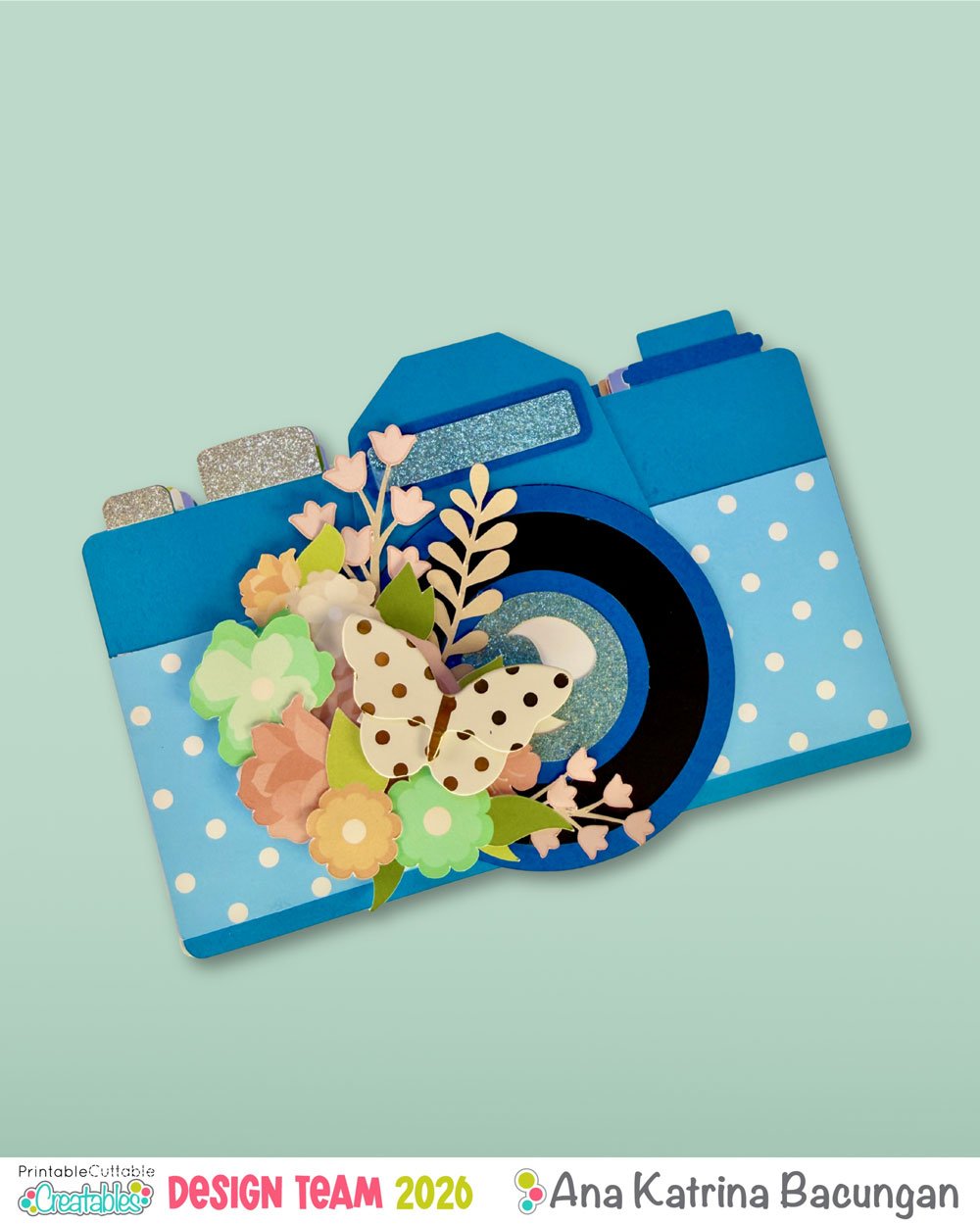

I absolutely love making mini albums, and whenever I feel like switching things up, I look for a fun SVG and turn it into an album shape. Shaped albums are so much fun to create, they instantly make a project feel special, unique, and a little extra before you even start decorating.
For today’s project, I’m sharing how I turned a camera SVG into a mini album. A camera-shaped album is perfect for documenting trips, everyday moments, creative adventures, or even just happy memories worth capturing. It’s cute, interactive, and already tells a story just by its shape.
For this project, I used Printable, Cuttable and Creatables’ Vintage Camera cut file, and I’ll walk you through how I made it from start to finish.
Materials Used:
- Cricut Maker
- Solid cardstock
- Glitter cardstock
- Patterned papers
- Printable, Cuttable and Creatables – Spring Polka Dots Digital Paper Pack
- Cut file of your preferred album shape
- Printable, Cuttable and Creatables – Vintage Camera
- Embellishments
- Printable, Cuttable and Creatables – Spring Flower Group
- Bearly Art Precision Glue
- Butterfly embellishment
Instructions
1. Upload your Vintage Camera cut file into Cricut Design Space and resize it to your desired album size. My camera size was 7.30 x 5.25 inches, which allowed me to cut two camera bases on one A4 sheet. This will serve as the album cover.

2. Select the camera and create an offset with a distance of 0. This offset will be exactly the same size as your camera and will serve as a double backing for the front cover to make it sturdier.


3. Duplicate this camera offset. This will be your back cover.

4. Make another duplicate of the back cover.


5. Select both the back cover duplicate and the front cover double backing, then flip them horizontally.


6. You’ll now have a set of camera bases that will line up perfectly when glued back-to-back. These two cameras will fit nicely on an A4 sheet of cardstock.
7. Duplicate your album back cover bases. These will become your album pages.

8. Depending on how many pages you want, duplicate the camera page sets and cut them from different patterned papers.
9. Cut your Vintage Camera album cover and all the camera pages.


10. Assemble all the pieces of your camera album cover. One thing I really love about Printable, Cuttable and Creatables files is that they always include clear, step-by-step assembly instructions, making the process super easy.

11. For the binding strips, you can cut these using your machine or do it manually. Score the strip on the short side at 5/16” and 5/8”.

Assembling the Album
12. Take your camera offset piece (the one used as the front cover double backing) and one binding strip. Apply glue to the right panel of the binding strip and adhere it to the back of the camera, on the left side.


13. Flip the camera over, apply glue to the exposed side of the binding strip, and adhere your first page. Make sure you attach the flipped page so that all pages open in the correct direction.


14. Once dry, flip the page to the back and adhere another binding strip on top of the first one. Make sure the opening of the binding strip is facing left.


15. Adhere the matching camera piece of the same color from the previous page to close this section.


16. Add another camera page to the right binding strip, again making sure you use the flipped piece.

17. Repeat the process – flip, add a binding strip, and adhere the matching camera piece – until all pages are attached.


More Spring SVGS
-
Spring Polka Dots Seamless Patterns & Digital Paper Pack
Original price was: $2.25.$1.25Current price is: $1.25. -

Vintage Camera SVG Cut File
$1.45 -

Spring Flower Group SVG Cut File & Clipart
$0.95 -

Spring Butterflies SVG Cuts & Clipart
$1.45

18. Once you’ve attached your final page, add the last binding strip and attach one of your back covers, again making sure it’s the flipped one.


Spine & Finishing Touches
19. To create the binding cover, cut a piece of cardstock measuring 4 1/8 x 4 inches. Score it at 1 inch and 3 1/8 inches on the 4 1/8-inch side.

20. Fold along the score lines and adhere it to the spine. Secure the flaps to both the front and back covers.

21. Cover the front with your assembled Vintage Camera and the back with the remaining back cover page.


22. Prepare your embellishments. I used the Printable, Cuttable and Creatables Spring Flower Group.

23. Embellish your front cover.

Decorating the Pages
Now comes the fun part – decorating!

You can add photos right away, or if you’re making this album to fill later, add pockets, tuck spots, and embellishments now. That way, when you’re ready to memory keep, all you’ll need to do is add your photos and journaling.


That’s it!
I hope this inspires you to look at SVG files a little differently and turn them into unique, shaped mini albums.
Happy creating!
-Ana


Affiliate Disclosure: I may be an affiliate for some products recommended in this post. This means that if you purchase items through my links I will earn a small commission, at no extra cost to you. I only recommend products that I have personally used and enjoy and when you order through my link, it helps me continue to offer you weekly free SVG files, digital papers, scrapbook sketches, tutorials, and other fun things. Thank you in advance for your support!